Rec v0.2.0 · free & open source · macOS

Your meetings,in the cloudoff the record.

Offrecord records your calls, transcribes them on your Mac and writes the summary, decisions and to-dos when you hang up. No bot joins the call. Nothing is uploaded.

No accountNo uploadMITApple silicon
Product sync – Q3 launch
28:31 ■ Stop
Them 27:48We decided to launch on September 12.
Me 27:55That gives QA one more week for the export feature.
Them 28:06Alex will fix the remaining export bugs by Friday.
Me 28:19I'll rewrite the pricing copy and share a draft by Thursday.

Summary

Launch moves to September 12 to give QA time for export. Pricing copy and export bugs are the last open items.

Decisions

  • Launch on September 12

To-dos

  • Alex: fix export bugs · Fri
  • Me: pricing copy draft · Thu
Listening… notes are written when the call ends
Written on-device

Works with any call on your Mac

  • Zoom
  • Google Meet
  • Microsoft Teams
  • Slack
  • WhatsApp
  • FaceTime
  • In person
00:00Record

One click, both sides of the call. Or no click at all.

Offrecord captures your microphone with Apple's voice processing and the other side from system audio. When another app opens your mic for a call, it offers to record, and it stops when the call ends.

⌃⌥R

Start from anywhere

Global shortcut, menu bar icon, or the record button. Add the screen too if you want a video.

auto

Call detection

Sees which app is using the microphone and offers to record. Ends the recording when the call does.

.caf → .m4a

Crash-safe by design

Audio is written to disk while you talk. If your Mac stops mid-meeting, the recording is recovered on next launch.

⌘B

Stays out of the way

A floating bar with timer, levels, a note field and stop. Bookmark key moments without leaving the call.

Floating Offrecord recording bar with timer, level meters, note field and stop button
00:01Transcribe

A live transcript that knows who said what.

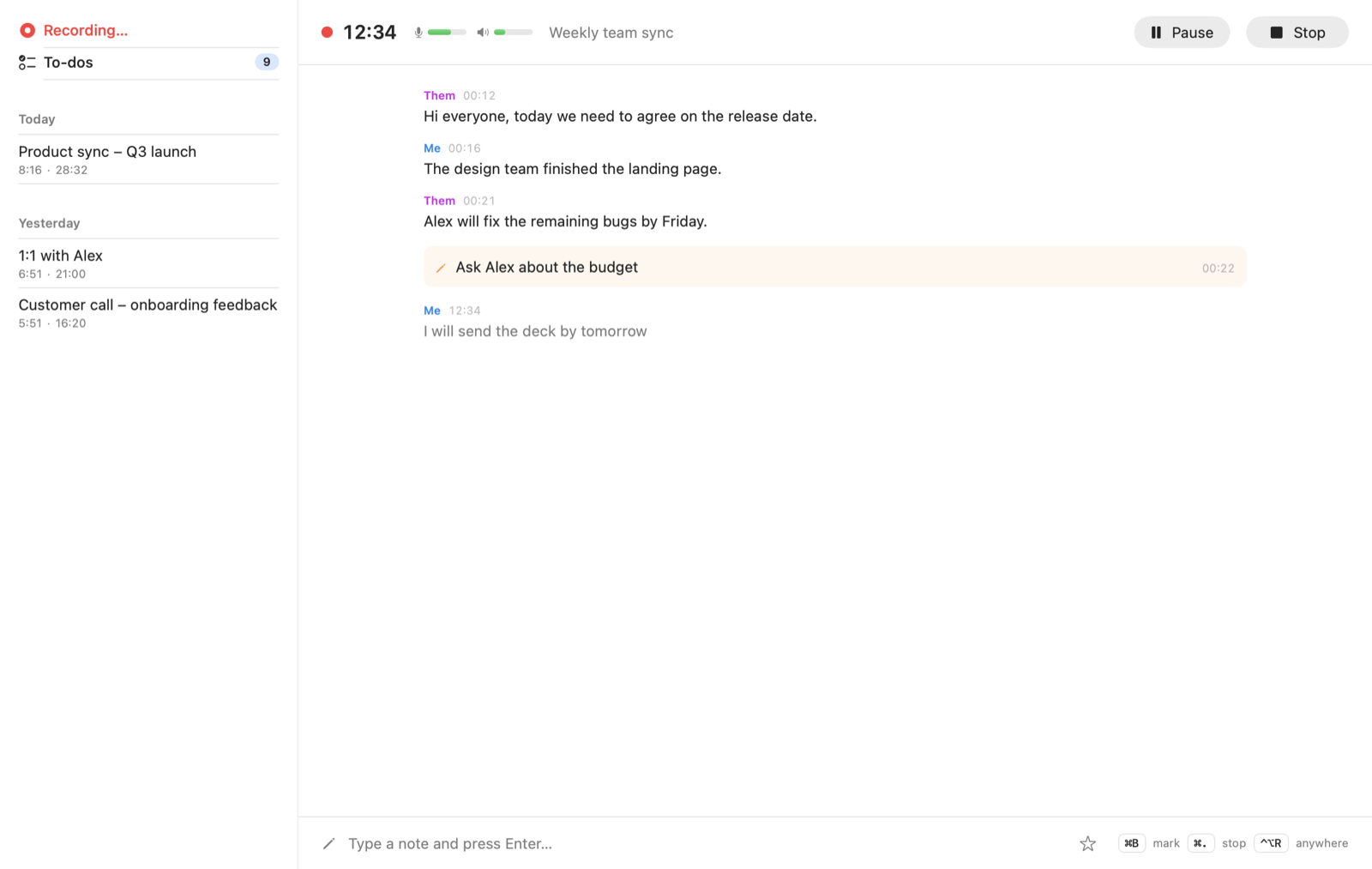
Apple's on-device SpeechAnalyzer transcribes as you talk. Your mic and the call audio are transcribed separately, so every line is labelled Me or Them without guesswork.

Them 04:12Users still find the pricing page confusing.
Me 04:20I will rewrite the pricing copy and share a draft by Thursday.
EnglishTürkçeDeutschFrançaisEspañolItaliano日本語…every language your Mac supports
Recording
Offrecord live on-device transcript with Me and Them speaker labels while recording a call
28:32Notes

Hang up. Your notes are already written.

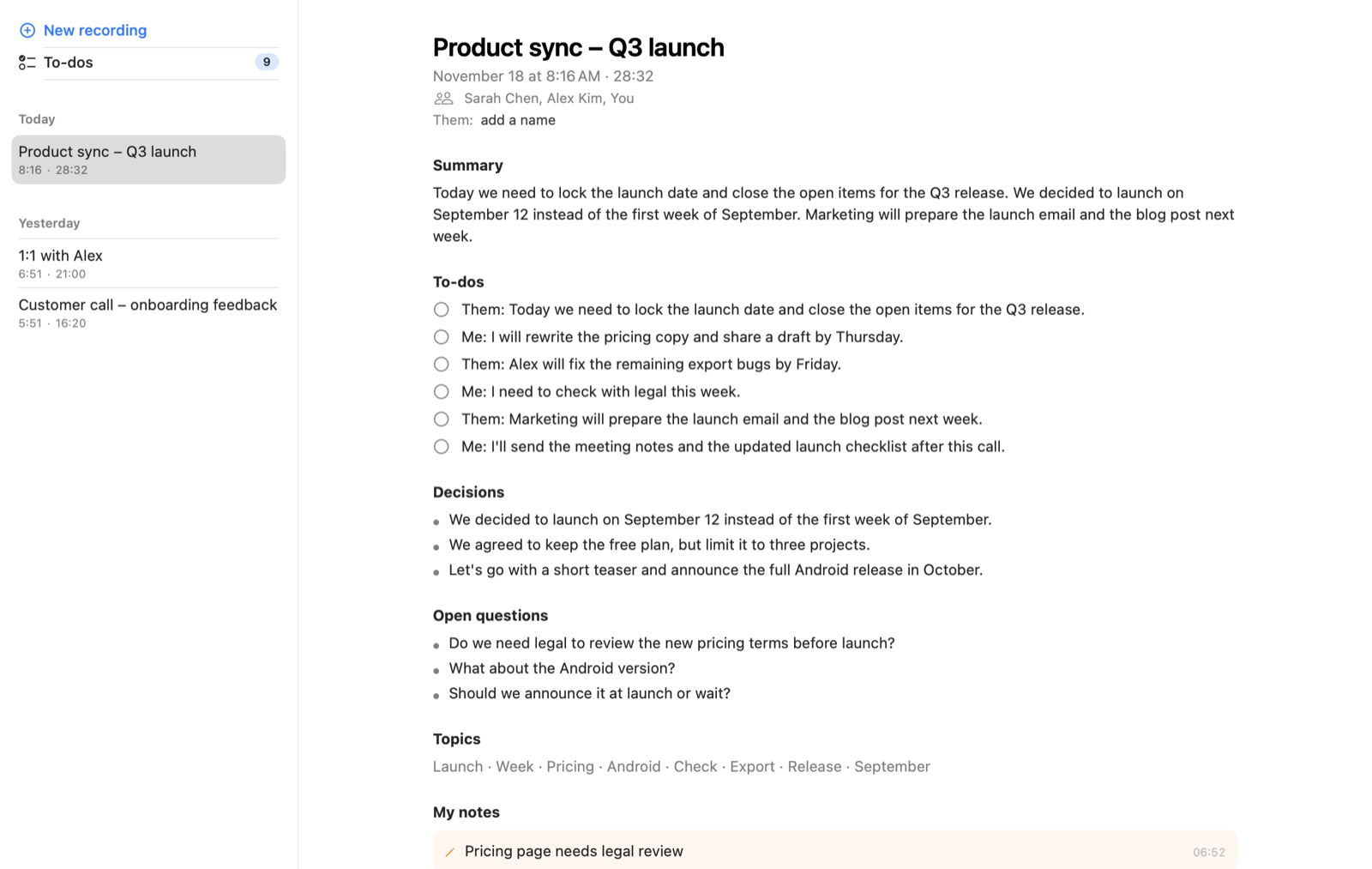
A summary, key topics, decisions, action items and open questions, saved as Markdown next to the audio. Apple Intelligence writes them on-device when it's on; local rules take over when it isn't.

Product sync – Q3 launch
Offrecord meeting notes with summary, to-dos, decisions and open questions generated on-device
to-dos

Every promise in one list

Action items from all your meetings are collected in one checklist, so "I'll send it by Thursday" doesn't get lost.

notes.md

Plain files you own

audio.m4a, notes.md and JSON in a folder you choose. Open them in any editor, sync them anywhere.

+Everything else

All the small things a meeting app should do.

Clear audio

Voice processing during calls and level balancing afterwards, so a quiet mic is still easy to hear.

Calendar aware

Names the recording after the current event and lists its attendees.

Full-text search

Find anything across titles, notes and transcripts.

Transcribe files

Drop in an existing audio or video file with ⌘O.

Screen recording

Optional video of a whole display or a single window, with the same echo-free audio.

English & Türkçe

Interface in English or Turkish, switchable instantly in Settings.

vsCompare

The note taker that never leaves the room.

Otter.ai, Fireflies, Fathom and Granola process your conversations on their servers. Offrecord does the same job on your own Mac.

OffrecordTypical cloud note taker
Where audio is processedOn your MacVendor's servers
Bot joins your meetingNeverOften
Works with any app or in personYesUsually specific platforms
Account requiredNoYes
PriceFree, open sourceMonthly subscription
Your filesAudio, Markdown, JSON in your folderInside the vendor's app
~1 minInstall

Download it, or build it in a minute.

Grab the app from the latest release, or build it yourself with one script. Building from source avoids the first-launch warning and keeps permissions across updates.

option 1 · download

Get the app

Download the zip, move Offrecord to Applications and open it. It isn't notarized yet, so the first time click Open Anyway in System Settings › Privacy & Security.

Download latest release

option 2 · recommended

Build from source

One script checks your Mac, creates a local signing certificate, builds the app and installs it. No Apple Developer account, no warning.

Terminal — zsh
❯ git clone https://github.com/RamazanBakir/offrecord.git
❯ cd offrecord
❯ ./scripts/install.sh
  ✓ macOS 26 · Apple silicon · Swift toolchain
  ✓ Local signing certificate
  ✓ Built and installed ~/Applications/Offrecord.app
macOS26 Tahoe or later
MacApple silicon (M1+)
ToolsXcode Command Line Tools
UpdatesIn-app notice when a release is out
?FAQ

Questions.

Does Offrecord send my recordings to the cloud?

No. Recording, transcription and note generation all run on your Mac. The only request the app makes is an update check that reads the latest version number from GitHub, and you can turn it off in Settings.

Does it join my Zoom, Google Meet or Teams call as a bot?

No. It records your Mac's microphone and system audio, so it works with any call app and other participants see nothing new.

Do I need Apple Intelligence?

No. With Apple Intelligence on and a supported language, Apple's on-device model writes the notes. Otherwise a local rule-based extractor is used.

Which languages can it transcribe?

Every language Apple's on-device speech recognition supports on your Mac. It detects automatically whether a meeting is in your system language or English, separately for each side. The interface is in English and Turkish.

Why macOS 26 and Apple silicon only?

The on-device transcription engine, SpeechAnalyzer, was introduced in macOS 26.

Why does macOS warn me when I open the downloaded app?

Offrecord isn't notarized by Apple yet, which needs a paid developer account. Click Open Anyway in System Settings › Privacy & Security once, or build from source to avoid the warning.

How do I get updates?

Offrecord tells you in the app when a new version is released. Download the new zip, or run git pull && ./scripts/install.sh if you built from source.

Is it legal to record calls?

Laws differ between countries and states, and many require everyone's consent. Tell people when you record and follow the rules that apply to you.

Offrecord app icon

Keep it off the record.

Free, open source and built on Apple's own frameworks. Star the repo to follow releases, or open an issue with ideas.